





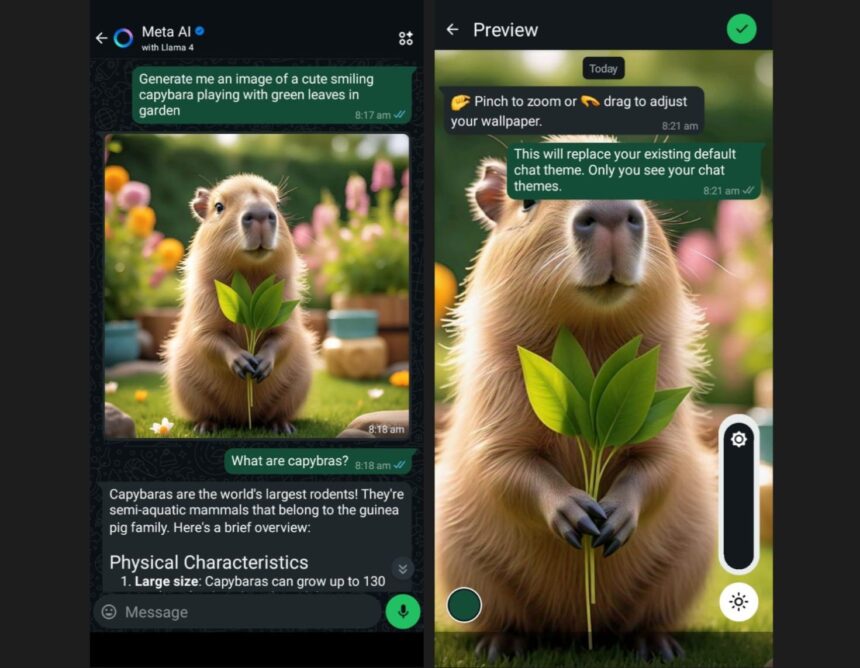
In recent months, capybaras have taken over social media and with them the WhatsApp messaging platform, Meta’s popular service, has added new features that allow users to customise their experience on the app. These new features are inspired by the capybara which is an animal known for its calm and sociable demeanour.
These tools, dubbed “capybara mode,” offer the ability to create custom images using artificial intelligence, modify chat background, and generate stickers, all within an environment completely adapted to the rodent’s style.
What is capybara mode?
The Capybara Mode isn’t a single feature that you can activate by a single command. Instead, it’s comprised of various options that users can enable based on their preferences.
These options are available for both Android and iOS devices and allow users to immerse themselves in the phenomenon that has captivated the internet in 2025. From generating funny images with AI to creating custom stickers, the mode offers multiple ways to integrate capybaras into WhatsApp’s messaging experience.
How to Generate Images with AI in WhatsApp
One of the most notable features of the Capybara Mode is the ability to generate custom images using artificial intelligence. To try it out, just open WhatsApp and tap the blue circle icon at the bottom of the screen which will take you to the Meta AI assistant. From there, you can ask the AI to generate images based on your own personalised descriptions.
Some examples of descriptions that can help create interesting images include: “Capybara wearing sunglasses on the beach,” “Capybara reading a book in the forest,” or even “Capybara astronaut in space.” Creativity is the only limit, and the result can be used in a variety of ways within the app, whether as a chat background or as a base for creating custom stickers.
Customise Your Chat Background with Capybara Images
Another interesting option offered by ‘capybara mode’ is the ability to change the chat background using images of the animal. To do this, users must have an image of the capybara, either generated using AI or downloaded from another source. They must then follow these steps:
- 1. Open WhatsApp and go to ‘Settings‘.
- 2. Go to the ‘Chats‘ section and select ‘Default Chat Theme‘.
- 3. In the ‘Wallpaper’ option, select ‘Choose from gallery’ and select the desired image.
- 4. Adjust the size and brightness of the photo as desired.
- 5. Finally, confirm your selection by clicking the green pimp icon in the top right corner.
- 6. This process allows each conversation to have a capybara-inspired theme, adding a personalised and fun touch to the messaging experience.
This process allows each conversation to have a capybara-inspired theme, adding a personalised and fun touch to the messaging experience.

Create custom stickers with AI
WhatsApp also allows users to create custom stickers based on images generated by artificial intelligence. To do this, simply open a conversation, go to the stickers tab, and select the “Create” option.
You can then select “Use AI” and provide a description to generate a unique capybara sticker. This feature expands the customisation possibilities, allowing users to design stickers that suit their tastes and preferences.
Why WhatsApp integrated ‘Capybara Mode’
By incorporating “Capybara Mode,” WhatsApp is not only seeking to offer a more fun and personalised experience to users, but is also tapping into a growing global trend.
The tools enabled by Meta allow its massive user base to connect with these new trends. WhatsApp’s ‘Capybara Mode’ is one of the most unique features of 2025, allowing users to personalise their experience through the integration of AI and a touch of humor inspired by an animal that has won the internet over.